If your citizenship says Prabhakar Gautam and you want prabhakargautam.com.np, you can probably register it without paying a domain fee. But Nepal's .np registry doesn't work like buying a .com from a normal registrar. Your requested name, your supporting document and your DNS information all need to satisfy the registry's own rules, and someone at the registry reviews your application before it goes live.
.np is Nepal's country-code domain, and .com.np is its open, broadly-used extension: available to individuals, companies, organizations, schools and other entities that meet the eligibility rules. Registration and modification are currently free of cost, but the application is reviewed rather than instant, and your documents get checked. This guide was checked directly against the official registry's own pages in August 2026, including its terms, FAQ, rejection-cause list and DNS instructions, so you can follow it instead of piecing together five outdated blog posts.
Quick Answers
- Is .com.np free?
- Yes. Domain registration and modification under .NP are currently free of cost according to the official registry. You still separately pay for hosting if you want a live website, the same way a free domain elsewhere still needs a server behind it.
- Where do I register?
- Through Nepal's official .np registry at register.com.np, run by Mercantile Communications. There is no other official channel for a genuine .com.np domain.
- What do I need?
- An eligible domain name connected to your own identity or your organization, the correct supporting document for your applicant type, a register.com.np account, and valid nameserver information.
- How long does approval take?
- The official FAQ currently states around 3 to 4 business days or more, depending on the registration backlog and how long your documents take to verify.
Start Here: .com.np Registration in 7 Steps
Here's the whole process condensed, before the detailed walkthrough below. If you already know roughly what you're doing, this may be all you need.
Before Starting, Prepare These
The single biggest cause of wasted time in this process is choosing a name before checking what you're actually allowed to register. Prepare based on which type of applicant you are.
Personal application
- An accepted identity document: citizenship, passport, driving licence, voter's card, NRN ID card, or a Nepalese resident visa for qualifying foreign nationals.
- A domain idea based on the name printed on that document, not a business keyword.
- A scan or clear photo of the document, ready to compress under 800 KB.
Company / organization application
- The relevant registration certificate for your entity type (see the documents table below).
- A domain name connected to your registered company, brand, product or service name.
- An official request letter on letterhead, with stamp and authorized signature, ready to attach.
krishnagautam.com.np. This guide can show you illustrative examples, but final approval always belongs to the registry, not to any tutorial.Who Can Register a .com.np Domain?
The registry doesn't just say "Nepali citizens." Eligibility spans several categories, and it matters which one actually applies to you.
Register with a citizenship certificate (or another accepted personal ID). The domain must be based on your own documented name.
Register with a certificate of registration for the company, firm, partnership or organization. The domain must connect to the registered name, brand, product or service.
An NRN ID Card is one of the accepted personal identity documents, alongside citizenship, passport, driving licence and voter's card.
A Nepalese resident visa is accepted for qualifying foreign nationals applying personally.
Register with a certificate of registration for a branch or liaison office, or a certificate of affiliation with the Social Welfare Council, depending on how the entity operates in Nepal.
A PAN registration certificate is accepted for businesses operating without full incorporation.
Any local or foreign entity with business interests in Nepal can apply using a trademark registration certificate in Nepal, or an official trademark-application filing receipt from the Department of Industry. If you use the filing receipt, the registry expects the actual trademark registration to follow within roughly three years.
These categories reflect the registry's current published rules. If your situation is unusual, for example a partial partnership or an entity that doesn't fit neatly into one category, the safest move is confirming directly with the registry rather than guessing.
What .com.np Domain Name Can You Register?
How do I register a .com.np domain? Search availability, create an account, verify your email, provide applicant and DNS information, upload the required documents, then submit and wait for registry verification. The full walkthrough is below, but the name itself has rules worth understanding first.
The registry requires the requested name to be "an exact match, abbreviation or acronym of the registrant's name or trademark; or otherwise closely and substantially connected to the registrant." On top of that relationship requirement, the technical naming rules are:
- Minimum of 3 characters.
- Letters, numbers and hyphens are permitted.
- A hyphen cannot be the first or last character.
- Internationalized Domain Names (names starting with
xn--) are not currently offered. - Offensive, generic or inflammatory names may be rejected regardless of technical validity.
ramprasadsharma.com.np
ramsharma.com.np
Documented name: Ram Prasad Sharma. Both options are substantially based on the name itself.
bestlaptopnepal.com.np
A generic commercial keyword with no connection to Ram's documented name or to a registered brand he owns.
These examples are illustrative, not a guarantee. The registry makes the final call on every application, and a name that looks reasonable can still be rejected if the documented connection isn't clear enough.
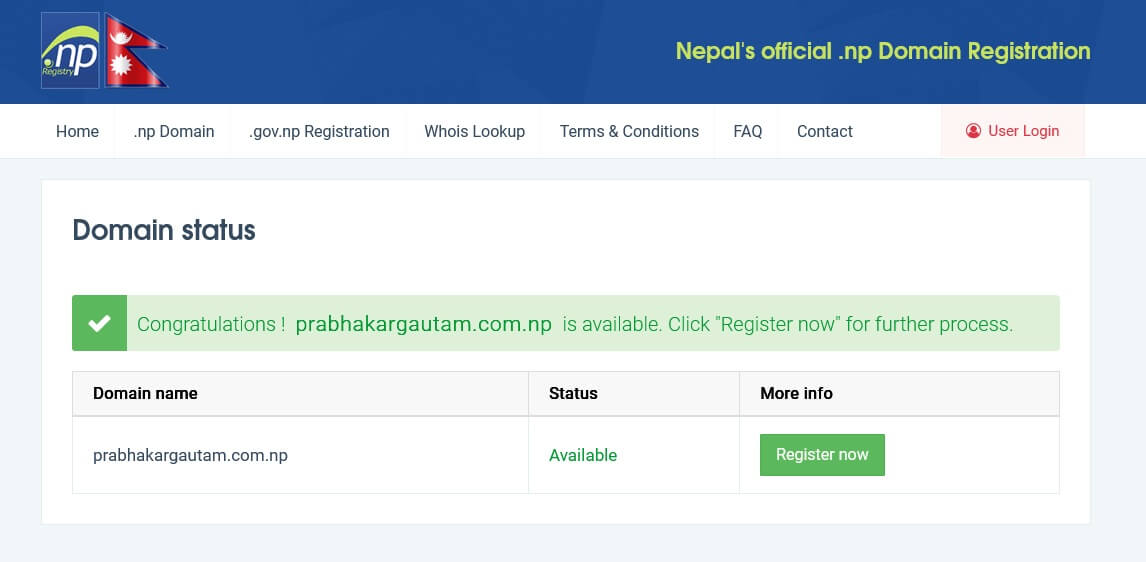
Step 1: Check Whether Your .com.np Domain Is Available
A note on screenshots: this guide is written and fact-checked directly from the registry's own published instructions, terms and FAQ pages rather than from a live browsing session, so it doesn't include portal screenshots. Every button and field name referenced here, Register Now, Active Domain, Edit DNS, Edit Info, comes from the registry's own documentation rather than a guess. If you'd like, send us screenshots from your own registration and we'll add them to make this guide even more concrete.
Step 2: Create Your Account
The account form asks you to enter your full name consistent with your identity document and use a valid email address as your login.
- Use an email you control permanently, not a shared or temporary one.
- Enter your legal or documented name correctly, matching the ID you'll upload.
- Never use someone else's email address for your account.
- Use a secure, unique password.
- Keep this account. It's what you'll use to manage the domain, including nameserver changes, long after approval.
The registry's own policy also expects the domain's administrative name and email to belong to the actual domain owner, not just a technical contact managing it on someone else's behalf. Keep that in mind when filling in contact fields later.
Step 3: Verify Your Email
After creating your account, the registry sends a verification email to the address you registered with.
- Check your inbox first, then your Spam or Junk folder if it doesn't appear within a few minutes.
- Double-check you typed the email address correctly during signup; a typo here is a common, easily-missed reason the email never arrives.
- Click the verification link before attempting to sign in and continue the application.
We won't invent a specific expiry time for the verification link since that detail isn't something we could confirm from the registry's published pages at the time of writing. If your link has expired, look for a resend option on the sign-in page, or contact the registry's support address below.
Step 4: Sign In and Start the Domain Application
Once verified, sign in and open the registration form for the domain you searched in Step 1. The form asks for two kinds of contact information.
| Contact type | What it means |
|---|---|
| Administrative | The primary contact of the domain owner: name, company name, address, phone and email. This should be you, or your organization's authorized representative. |
| Technical | The person who actually maintains the domain day to day. You can list an alternative contact here if someone else, such as a developer, handles the technical side. |
Most personal applicants shouldn't overthink this: if you're managing everything yourself, you're both the administrative and technical contact.
What Should I Enter in the Nameserver Fields?
A nameserver simply tells the internet which DNS provider is responsible for your domain. This is where a lot of beginners get stuck, so it's worth slowing down here.
The registry expects FQDN nameservers (a full domain name like ns1.examplehost.com), never a raw IP address. The rule is explicit: "Only FQDN based nameservers are accepted. IP addresses will not be entertained." Invalid DNS formatting is also one of the registry's listed rejection causes, so this single field is worth double-checking before you submit.
Option A: I already purchased hosting
Find the nameservers your hosting company gave you, usually in your welcome email or hosting control panel, and enter those exact values. Don't reuse nameservers you've seen in another tutorial; every host's nameservers are different.
Option B: I want to use Cloudflare
This matches Cloudflare's own documentation for a standard full setup: your domain receives two authoritative Cloudflare nameservers, which then need to be entered wherever your domain's authoritative nameservers are managed, in this case, your .np dashboard.
Option C: I don't have hosting yet
Registering a domain and hosting a website are two different things, and you don't have to solve both on the same day. You can submit your .np application with a placeholder nameserver setup (for instance, Cloudflare's free plan, even before you've built anything) and finalize actual hosting afterward. Just avoid guessing at nameservers or copying ones from an unrelated site; use ones that are actually yours.
Documents Required for .com.np Registration
What documents are required for .com.np? It depends entirely on your applicant type. Here's the current breakdown directly from the registry's own instructions.
| Applicant type | Accepted document(s) |
|---|---|
| Personal | Citizenship, passport, driving licence, voter's card, NRN ID card, or a Nepalese resident visa for qualifying foreign nationals |
| Local company / firm / organization | Certificate of registration for the company, firm, partnership or organization |
| Foreign entity registered in Nepal | Certificate of registration for a branch/liaison office, or certificate of affiliation with the Social Welfare Council |
| Non-incorporated business entity | PAN registration certificate |
| Trademark / business-interest application | Trademark registration certificate in Nepal, or an official trademark-application filing receipt from the Department of Industry |
How to reduce a document below 800 KB without making it unreadable
- Crop out unnecessary background before compressing; less image data means a smaller file at the same quality.
- Start from a clear scan or a well-lit photo, not a blurry or angled one, since compression only makes an already-poor scan worse.
- Resize sensibly. A document doesn't need to be 4000 pixels wide to be readable; 1200-1600 pixels on the long edge is usually plenty.
- Compress carefully and check the result. Most phones and free online tools can get a photo under 800 KB without visible quality loss at normal zoom.
- Before uploading, zoom in and confirm every name, number and date on the document is still clearly readable. An unreadable document is a listed rejection cause on its own.
Don't over-compress just to hit the size limit. A file that's small but illegible fails for the same reason as one that's too large to upload.
Do You Need a Cover Letter for .com.np Registration?
Be precise here rather than repeating a blanket rule. The registry's own rejection guidance explicitly requires an official request letter for company or organization requests, on official letterhead, with an appropriate stamp and an authorized signature. Personal-domain reverification also explicitly requires a formal request letter. For a brand-new personal application, check what the live form is actually asking for at the moment you apply, since requirements can be adjusted, rather than treating a letter as automatically mandatory for individuals.
Both templates are starting points, not guaranteed-approval text. Fill in every bracketed field accurately, keep the company version on real letterhead with an actual stamp and signature, and match the requested domain exactly to what you enter in the application form.
30-Second Final Checklist Before You Click Submit
How Long Does .com.np Approval Take?
How long does .com.np approval take? The official FAQ currently states around 3 to 4 business days or more, depending on the registration backlog. It typically takes longer than that if your submitted documents need extra verification or authentication.
Don't expect same-day approval as a default, and be wary of anyone promising a guaranteed 24-hour turnaround; that's not what the registry itself states. Check your account dashboard for the current status of your application rather than assuming a fixed timeline.
"Business days" here follows the normal Nepali work week, so Saturdays and public holidays generally don't count toward the estimate. A submission made late on a Thursday realistically starts its review clock the following working day, not the moment you click submit. If your organization's registration document needs authentication from another office before the registry can accept it, budget extra time on top of the 3-4 day estimate rather than around it.
| Dashboard status | What it usually means |
|---|---|
| Pending / Under review | Your application is in the queue or being checked against the naming and document rules. No action needed yet unless it sits here far longer than the stated estimate. |
| Active | Approved. The domain is registered to you and ready for nameserver propagation and use. |
| Rejected | Something in your application didn't meet the requirements. See the rejection guide below for the exact cause and fix, then reapply. |
| Reverification / Reverification State | The registry needs you to reconfirm ownership on an already-active domain. This is separate from a new application; see the reverification section further down. |
If your status hasn't changed after several business days and there's no obvious issue with your documents or naming, contact the registry's support channel directly rather than resubmitting a duplicate application, which can itself slow things down.
Why Was My .com.np Domain Rejected?
Why was my .com.np domain rejected? Almost always for one of a specific, known set of reasons: an unclear document, a missing letter, a name that doesn't match your documentation, or invalid nameserver formatting. Here's every major cause the registry lists, with what actually causes it and how to fix it.
Required information such as name, email or phone number was left incomplete on the form.
Fix: go back through every field and fill in anything left blank before resubmitting.
Domain names based solely on a last name or caste name can be reserved for organizations representing that name or community, rather than approved for one individual.
Fix: use your full name, not just the surname, for a personal application.
The extension doesn't match your applicant category, for example a commercial name submitted under an extension meant for education or nonprofits.
Fix: confirm you're actually applying under .com.np and that it fits your use case; see the extensions section below.
The uploaded file is blurred, cropped awkwardly, incomplete, or otherwise unclear.
Fix: rescan or rephotograph in good lighting, confirm every detail is legible before compressing, then re-upload.
Organizations must include an official request letter and company registration certificate, on official letterhead with a stamp and authorized signature.
Fix: use the company letter template above, print on real letterhead, sign and stamp it, then attach it.
No valid citizenship, passport, voter's card or driving licence was provided for a personal application.
Fix: attach one of the accepted personal identity documents listed in the documents section.
The requested domain isn't clearly based on the name on your submitted identity document.
Fix: adjust the requested name so it's substantially based on your documented name, not a nickname or unrelated word.
The requested name doesn't align with what's shown on the company's registration documentation.
Fix: request a name tied to the actual registered company name, product, service or brand, and be ready to show the documentary link.
A request letter was submitted, but it wasn't on official letterhead, or was missing the organization's stamp or an authorized signature.
Fix: reissue the letter on proper letterhead with both a wet or official stamp and a real signature.
Nameservers weren't in valid FQDN format, or a raw IP address was entered instead.
Fix: re-enter nameservers in the ns1.example.com style your host or Cloudflare actually gave you.
The registry may ask for extra proof of brand ownership or business registration beyond what was first submitted.
Fix: respond with the specific additional document requested rather than resubmitting the same application unchanged.
The application doesn't satisfy the registry's naming or eligibility policy even after the specific document issues are resolved.
Fix: re-read the naming rules and eligibility categories above, and consider whether a different, more clearly connected name would qualify instead.
See the registry's own rejection-cause page →
Your .com.np Domain Is Approved: What Next?
Most guides stop at approval. That's the wrong place to stop, since a domain with nothing pointed at it doesn't do anything for you yet.
Keep the email address on your registry account current. It's how you'll receive renewal-date notices and reverification requests later.
How to Connect a .com.np Domain to Cloudflare
This is the same process outlined in Option B above, laid out as its own reference since it's often searched separately: Cloudflare account → add domain → review DNS records → note the assigned nameservers → update them in your .np dashboard → wait for DNS to propagate → confirm SSL → test your site.
Nameserver modification requests on the .np side must go through the online dashboard; the registry is explicit that requests sent by email are not processed. Changes are handled roughly twice a day, and propagation can take up to 24-48 hours across the internet. Submitting the same change repeatedly doesn't speed this up, and can actually delay it further.
Cloudflare says "Pending Nameserver Update"
This means Cloudflare hasn't yet seen your domain's authoritative nameservers switch over. Rather than repeatedly resubmitting anything, verify: that you entered the exact nameservers Cloudflare assigned (not old ones from a previous host) into your .np domain's Edit DNS section, that enough time has passed for the twice-daily .np processing plus normal propagation, and that there isn't a typo in either nameserver value. If it's been several days with everything correct, contact the registry's domain administration team.
How to Change .com.np Nameservers Later
After logging in, click the ACTIVE DOMAIN tab to see your registered domains. From there:
- Use EDIT DNS to modify nameservers, for example when switching hosts or moving to Cloudflare.
- Use EDIT INFO to modify contact details, such as a changed phone number or administrative email.
- Use VIEW to confirm your domain's current saved details.
Modification requests are processed first-come, first-served, and requests missing required documentation are simply disregarded rather than actioned. This is another reason to keep your account's email and login safe long-term: it's the only official way to manage the domain going forward.
Does a .com.np Domain Need Renewal or Reverification?
Does .com.np expire? Not in the traditional pay-to-renew sense the registry currently describes, but don't take that as "never think about this again." Two related things are true at once in 2026, and you should know both.
If your dashboard shows a Reverification State, act on it. For personal domains, that means a formal request letter confirming ongoing ownership plus one of the accepted identity documents. For organizational domains, it means a request letter on letterhead with stamp and signature, plus your entity's registration documentation. The registry notes that domains left unaddressed risk administrative action, including having the domain released. There's no fixed public deadline stated beyond "complete the process at earliest possible," so don't sit on a Reverification State notice.
Read the registry's domain reverification page →
.com.np vs Other .np Extensions
Choosing the wrong extension for your situation is itself a listed rejection cause, so it's worth a quick scan before you apply.
| Extension | Intended for |
|---|---|
| .com.np | Open extension. Broadly used by companies, organizations and individuals; the most common choice. |
| .org.np | Primarily non-profit organizations. |
| .edu.np | Educational institutions: schools, colleges and universities. |
| .gov.np | Limited to Nepal government entities and agencies, administered separately by NITC. |
| .mil.np | Limited to the Nepal military. |
| .name.np | Open, intended for personal use by individuals specifically. |
| .net.np | Network infrastructure and portal-style sites. |
| .info.np | Open, general informational use. |
| .coop.np | Limited to cooperatives. |
This covers the registry's main published categories. If you're choosing between .com.np and .name.np for a personal site, or between .com.np and .org.np for a nonprofit, pick the one that actually matches what you are, since a mismatch is a documented rejection reason on its own.
Is .com.np Really Free?
Is .com.np free? Yes, registration and modification under .NP are currently free of cost directly from the registry, with no domain-purchase fee charged by register.com.np itself.
What isn't automatically free is everything you might want to do with the domain afterward:
- Web hosting: a free domain still needs a server to actually show a website.
- Premium or managed hosting: optional, but common for business sites.
- Business email: a professional inbox at your domain usually costs extra, separate from the domain itself.
- Website development: designing and building the actual site is a separate cost or task.
- Optional security or add-on services: things like premium SSL or monitoring, if you choose them.
A free domain is a real, meaningful saving, just don't confuse it with a fully free website.
Full Example Walkthrough: Prabhakar Gautam
Here's the whole process from start to finish using a fictional applicant, with obviously placeholder details.
No real citizenship numbers, addresses or private details are used here. This is a mental model of the process, not a template to copy field-for-field.
Need These Templates in Your Own Details?
Copy either request-letter template above with the buttons provided, then replace every bracketed field with your own accurate information before printing, signing and (for organizations) stamping it.
Sources
This guide was fact-checked directly against the following official pages in August 2026. If any of these instructions change, the registry's own pages are the source of truth, not this article.
| Topic | Official source |
|---|---|
| Registration instructions & documents | how-to-register-np-domain |
| Terms, fees & naming policy | terms-and-conditions |
| FAQ & approval time | FAQs |
| Rejection causes | rejection-cause |
| DNS & nameserver rules | how-to-apply-dns |
| Reverification process | domain-reverification |
| Extension categories | np-ccTLDs |
| Editing an existing domain | how-to-modify-np-domain |
| Cloudflare full setup | Cloudflare Docs |
This guide explains the current .np registry process as published by register.com.np. It is independent and not affiliated with Mercantile Communications or the .NP registry. For binding rules, always confirm directly on the official registry site.