Nepali Typing Tutor Modes
Preeti Typing Tutor Practice
Preeti is a traditional Nepali font-based keyboard layout. It is still common in older Word files, government office documents, publishing workflows and some typing-practice environments. In Preeti mode, you learn physical key mappings instead of phonetic spelling.
Learn Nepali Unicode typing
Unicode stores Nepali as standard digital text. The Unicode mode in this tool uses Romanized input, so words such as namaste can produce Devanagari text. Unicode is better for websites, email, mobile apps, search and document sharing.
English QWERTY
English mode helps users practise standard keyboard familiarity, speed and accuracy. It is useful for reports, email, office work, data entry and exams that include English typing.
Timed test and game practice
Timed tests are available for 1, 3 and 5 minutes. The game mode adds light pressure, but the main goal remains the same: type correctly, reduce errors and build steady rhythm.
Step-by-Step Typeshala Typing Lessons
The lesson path is progressive. Early stages isolate a small group of keys. Later stages combine rows, vowel marks, half forms, words and longer sentences. This matters because Nepali typing becomes difficult when a learner skips the basic finger positions and jumps directly to full sentences.
| Stage | Lesson focus | What users practise | Target before moving on |
|---|---|---|---|
| 1 | Home Row Keys | S, D, G, H, J, K, L and semicolon positions | Comfortable finger placement |
| 2 | Home Row Words | First Nepali word patterns from learned keys | Slow but clean word typing |
| 3 | Top Row | Q to P row and row transitions | Less looking down |
| 4 | Bottom Row | Z to M row and lower-key movement | Stable full-keyboard reach |
| 5 | Vowel Marks | का, कि, कु, के, को, की patterns | Matra accuracy |
| 6 | Half Forms | क्, न्, ज्, त्, म् and halant-style combinations | Conjunct confidence |
| 7-8 | Sentences | Short and common sentence patterns | Rhythm with punctuation |
| 9 | Lok Sewa Short | Useful short formal sentences | Exam-style accuracy |
| 10 | Advanced | Longer lines and mixed difficulty | Timed-test readiness |
Do not treat the stages like a checklist to finish in one sitting. Stage 1 and Stage 2 are where finger memory starts. If those rows are weak, later lessons feel harder than they should. A better habit is simple: repeat the same stage until mistakes become boring.
Online Typing Tutor vs Desktop Software
Many users still search for a Typeshala download because older desktop typing tutors were common in computer institutes. The problem is that old installers may not work cleanly on newer Windows versions, school computers, shared office machines or locked-down laptops. A browser-based Typeshala page avoids that issue.
With this online version, the practice starts in the browser. There is no installer, no account and no software update to manage. That makes it practical for students using a cyber cafe, Lok Sewa candidates practising from different computers, or office staff who cannot install random software on a work machine.
When online is easier
Use the browser version when you want quick practice, shared-computer access, no installation and the same lesson flow on any modern device.
When download still matters
If an office or institute requires a specific offline program, follow that requirement. For regular practice, the online version is simpler and safer.
Should You Learn Preeti or Nepali Unicode?
Preeti and Unicode both display Nepali text, but they solve different problems. Preeti is tied to a font and older key mappings. Unicode is a text standard that works across modern devices and websites. A student preparing for office or exam work may need Preeti. A writer publishing online should normally use Unicode.
| Feature | Preeti | Nepali Unicode |
|---|---|---|
| Text standard | Font-based legacy layout | Standard digital text |
| Learning method | Memorise key mappings | Romanized sound-based input in this tool |
| Web compatibility | Limited without the font | Strong across browsers and devices |
| Common use | Older documents, offices and layout work | Websites, apps, email and modern documents |
| Sharing documents | Recipient may need Preeti font | Usually displays without extra fonts |
If you work with old Preeti files, keep the Preeti to Unicode Converter nearby. If you only need quick Nepali writing without lessons, use Easy Nepali Typing.
Typeshala WPM and Typing Accuracy Test
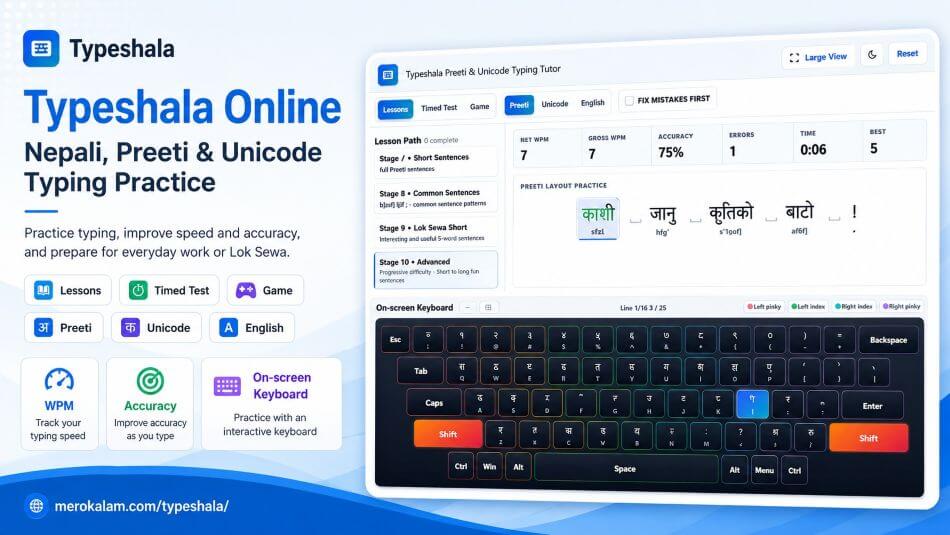
The tool shows Gross WPM, Net WPM, Accuracy, Errors, Time and Best. Gross WPM measures raw keystroke speed. Net WPM is stricter because it subtracts uncorrected errors.
For learning, accuracy should come first. If your Gross WPM is much higher than your Net WPM, you are typing fast but losing marks through mistakes. Slow down, repeat the weak stage and then return to timed practice.
Accuracy Reading
Accuracy percentage shows how many keystrokes were correct out of all attempts. Use it to decide whether to move forward, slow down, or repeat the stage.
| Net WPM range | Practical level | What it usually means |
|---|---|---|
| 10-19 | Beginner | Still learning key positions and looking down often |
| 20-29 | Basic use | Can type simple words, but speed drops with matras and punctuation |
| 30-39 | Functional practice level | Good enough for many daily tasks if accuracy stays stable |
| 40-54 | Comfortable office level | Can handle longer passages without fighting the keyboard |
| 55+ | Advanced | Strong rhythm and fewer pauses between words |
Learn Preeti Typing for Lok Sewa Practice
Typeshala can help Lok Sewa candidates build timed typing discipline. Use Preeti lessons for key memory, then use 3-minute and 5-minute timed tests to practise under pressure. Formal words, punctuation, half forms and repeated attempts matter more than one lucky fast test.
For government-style preparation, practise the same way you expect to perform: sit straight, keep both hands on the keyboard, avoid checking the physical keys, and do not restart every time one word goes wrong. Real typing confidence comes from recovering from mistakes without losing rhythm.
| Practice phase | Mode to use | What to watch |
|---|---|---|
| First week | Lessons, slow pace | Finger placement and accuracy |
| After basic keys feel known | Fix Mistakes First | Repeated wrong keys and skipped words |
| Before an exam or skill test | 3-minute and 5-minute timed tests | Net WPM, accuracy and typing under pressure |
How to Improve Preeti and Unicode Typing Speed
- Practise accuracy before chasing speed.
- Use the correct fingers shown by the on-screen keyboard.
- Avoid looking down at the physical keyboard continuously.
- Repeat weak lessons instead of jumping ahead.
- Use short, regular 15-30 minute sessions.
- Review frequently mistyped keys and characters.
- Keep wrists relaxed and avoid hitting keys too hard.
- Use timed tests only after the basic lesson feels stable.
Practise short, not random
A focused 15-minute session on weak keys is usually better than one long session where you keep repeating the same mistakes.
Use Net WPM as the honest number
Gross WPM can look impressive, but Net WPM shows usable speed after errors. Watch the gap between the two numbers.
Keep one layout per session
Do not jump from Preeti to Unicode every two minutes. The memory path is different, and mixing too early slows learning.
Repeat government words
Words such as सेवा, नागरिक, सरकार and कार्यालय appear often in formal typing practice. Repeat them until the key sequence feels automatic.
Common Mistakes While Learning Nepali Typing
| Mistake | Why it hurts | Better habit |
|---|---|---|
| Typing fast too early | Bad finger paths become automatic | Repeat slow accurate lines first |
| Looking down every word | Stops touch-typing memory | Use the on-screen key hint instead |
| Mixing Preeti and Unicode rules | The input methods are different | Practise one mode per session |
| Skipping half forms | Real Nepali text becomes difficult | Repeat Stage 6 until it feels normal |
| Trusting one good score | One test can be lucky | Track progress across several sessions |
Beginner Preeti Keyboard Layout
This beginner chart uses mappings from the tool's Preeti keyboard data. It is not the full layout, but it covers the keys a new learner sees early.
| English key | Preeti output | Shift output | Practice note |
|---|---|---|---|
| s | क | क् | Core home-row consonant |
| d | म | म् | Common in names and words |
| g | न | न् | Important for half forms |
| h | ज | ज् | Home-row right hand |
| j | व | ो | Shift form is very common |
| k | त | त् | Core right-hand key |
| l | ि | ी | Vowel mark key |
| ; | स | र | Right pinky practice |
Typeshala Typing Tutor Features
- Free browser-based typing practice with no software installation.
- Preeti, Romanized Nepali Unicode and English QWERTY practice modes.
- Structured 10-stage lesson path for each layout.
- Timed tests for 1, 3 and 5 minutes.
- Live Net WPM, Gross WPM, accuracy, errors, time and best score.
- On-screen keyboard with finger-zone guidance.
- Fix Mistakes First mode for accuracy-focused practice.
- Typing game for extra practice after lessons.
- Progress and keyboard preferences saved locally in the browser.
Privacy While Using the Typing Tool
The typing interaction runs in your browser. The page does not ask for your name, email or account. Progress such as best WPM, completed lessons, keyboard position and theme preference may be saved in your browser's localStorage. If you clear browser data or switch devices, that saved progress may reset.
Use Typeshala on Desktop, Laptop and Mobile
The page opens on desktop, laptop and mobile browsers. For serious typing practice, use a physical keyboard. Mobile screens are useful for reading instructions, checking lessons or using an external Bluetooth keyboard, but touchscreen typing does not train the same finger memory as physical keys.
When to Use Easy Nepali Typing Instead
Typeshala is for practice and skill building. If you only need to write one paragraph in Nepali right now, the faster path is Easy Nepali Typing. Use Typeshala when your goal is speed, accuracy and keyboard memory. Use Easy Nepali Typing when your goal is quick Romanized-to-Devanagari writing. If you need to type and format a full document once you know the layout, the Nepali Keyboard tool adds a Word-style editor with TXT, DOCX and PDF export.
Related Nepali Typing Resources
- Nepali KeyboardType and format full Nepali documents in Preeti, Unicode or English.
- New to Preeti? Beginner to Advanced GuideLearn the keyboard, matras and half forms step by step.
- Easy Nepali TypingWrite quick Romanized Nepali without a lesson path.
- Preeti to Unicode ConverterConvert old Preeti documents into modern Nepali Unicode.
- Unicode to Preeti ConverterPrepare Unicode text for legacy Preeti workflows.
- Preeti Font DownloadInstall Preeti for old documents and desktop publishing.
- Typing Tutor ComparisonCompare Nepali typing tutor options before choosing.
- Typeshala on Windows and MacLearn how browser-based practice differs from old software.
- Lok Sewa Typing GuidePrepare for computer operator typing and practical exams.
- Beginner Typing Practice PlanFollow a step-by-step Nepali typing roadmap.